
Digital Planning Studio – A Simple, Structured Way to Transform Your Personal Budget
Managing a personal budget has become both more essential and more overwhelming in the past decade. With subscriptions exploding, cost-of-living increases, and financial tools scattered across multiple apps, more people are looking for straightforward systems that make money management less stressful—not more complicated. Digital Planning Studio aims to fill that exact need with its spreadsheet-based budget planner designed for Google Sheets.
After exploring the platform, its features, and its overall approach to budgeting, this review breaks down what Digital Planning Studio offers, who it’s best for, and whether it deserves a place in your personal finance toolkit.
A Clear Mission: Making Budgeting Simple Again
The core offering from Digital Planning Studio is a downloadable Google Sheets planner focused entirely on helping users create and maintain a personal budget. Instead of building a new app or a subscription-driven software platform, the studio leans into something millions of people already use daily: spreadsheets.
This is refreshing in a time when every financial tool seems to demand an account, a login, a premium upgrade, and access to your banking information. Digital Planning Studio strips all of that away. It positions itself as a clean, customizable, easy-to-navigate spreadsheet that gives you complete control over your financial data—while still providing automation and dashboards to help you stay organized.
For people who enjoy visibility and structure without unnecessary complexity, this approach makes immediate sense.
Features: What You Get With the Planner
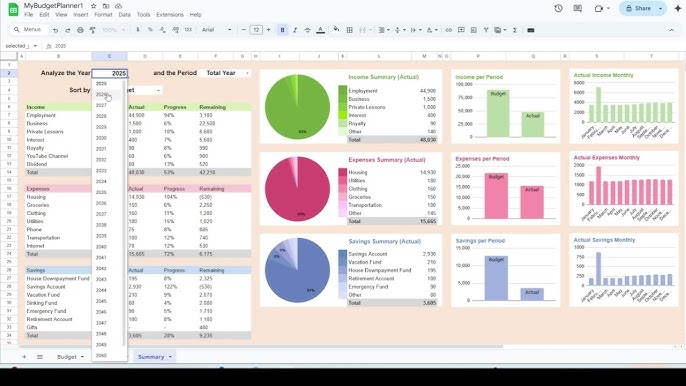
While the product is a spreadsheet, it certainly isn’t a simple grid of numbers. Digital Planning Studio has built a fairly comprehensive system around tracking income, expenses, savings goals, and monthly progress. Here’s what stands out:
1. Automated Monthly & Yearly Summaries
One of the biggest struggles in managing a personal budget is understanding not just how much you spent this month, but how your long-term patterns look. The planner includes:
Monthly overviews
Yearly rollups
Visual summaries
These allow you to see exactly where your money is going—without manually generating charts or pivot tables.
2. Expense & Income Categorization
Categories are the backbone of any effective personal budget, and the planner includes customizable categories for:
Fixed expenses
Variable expenses
Subscriptions
Savings contributions
Income sources
Users can tailor these categories to reflect their real-world financial life. This makes the system more intuitive and more effective than generic budgeting templates.
3. Historical Tracking & Trend Insights
Instead of only focusing on a single month’s budget, Digital Planning Studio encourages ongoing financial awareness. Trends matter. Tracking your personal budget over time helps you:
Identify spending habits
Spot patterns that are affecting savings
Prepare for predictable cycles (e.g., holiday spending, bills that spike seasonally)
The built-in historical tracking tools display these changes clearly.
4. Goal-Based Planning
For people who want to incorporate savings or debt-reduction goals into their personal budget, the planner supports:
Savings targets
Progress tracking
Automated calculations
This transforms the budget from something reactive to something strategic—helping you work toward long-term financial stability.
5. Compatibility & Control
Because everything runs in Google Sheets, users benefit from:
Cloud accessibility
Easy duplication
The ability to add or modify formulas
Universal compatibility across devices
This is especially appealing for people who dislike being locked into proprietary platforms or subscription-based apps.
Why Use a Spreadsheet Instead of an App?
This is one of the biggest questions people have.
There are dozens of budgeting apps available—so why would someone choose a spreadsheet for their personal budget instead?
You Own Your Data
Unlike apps that sync to the cloud, scrape transactions, or sell anonymized data, a spreadsheet keeps your financial information completely in your hands.
No Subscriptions, No Hidden Fees
With budgeting apps charging anywhere from $5 to $20 per month, a one-time purchase of a comprehensive planning tool can be significantly more cost-effective.
Unlimited Customization
Apps force you into their system. Spreadsheets let you:
Add tabs
Expand categories
Insert new fields
Modify formulas
Adjust the design
It becomes your system—not the system the app developer decided you should use.
Simplicity Wins
A personal budget works when it’s easy to maintain. Many apps sound powerful but become tedious or overwhelming. A spreadsheet is familiar, flexible, and—when well structured—far easier to stick with in the long run.
Digital Planning Studio clearly understands this and has built its planner around that philosophy.
Pros: Where Digital Planning Studio Shines
✔ Very User-Friendly
Even people who aren’t spreadsheet experts will feel comfortable navigating the planner. It removes the “blank spreadsheet anxiety” that keeps many people from starting a personal budget.
✔ Clean, Modern Design
The layout is visually appealing, easy to read, and not cluttered. The charts and graphs are a nice touch and help bring budgeting insights to life.
✔ No Learning Curve
Because everything operates within Google Sheets, there’s nothing new to install or learn.
✔ Cost-effective
At under $40 with a money-back guarantee, the planner is significantly more affordable long-term than most budgeting apps.
✔ Great for Long-Term Tracking
Most people abandon budgeting because it becomes complicated. This system supports a straightforward, year-round budgeting habit that helps users stay consistent.
Cons: Where It Could Improve
❗ Limited Social Proof
There aren’t many verified customer reviews available online. While the website seems legitimate, some buyers may feel more comfortable with a large set of testimonials.
❗ Spreadsheet Tools Aren’t for Everyone
If someone strongly prefers automation—like automatic bank syncing—a spreadsheet system may feel too manual.
❗ No Free Preview
A sample version or demo video would help users understand what they’re buying before committing.
❗ Lacks App-Based Convenience
If you like budgeting on your phone with push notifications and automated alerts, a spreadsheet may not match that experience.
Who This Budget Planner Is Best For
Digital Planning Studio is an excellent fit for:
Spreadsheet users who enjoy structure and customization
People who want a clean, organized personal budget without subscriptions
New budgeters who need something simple and clear
Financially independent individuals who prefer privacy and data control
Long-term planners who want to track goals, savings, and spending patterns
It may be less ideal for:
People who rely heavily on mobile apps
Anyone who wants automatic bank syncing
Those who dislike manual tracking
How Well Does It Support Real-Life Budgeting?
A personal budget is only useful if it fits into daily life. Based on its setup, this planner excels at:
Monthly Planning
It prompts you to intentionally decide how much you’ll spend, save, and set aside.
Realistic Spending Awareness
Regular input keeps you conscious of your habits instead of letting the month slip by.
Financial Clarity
Everything is easy to read and understand at a glance.
Progress Tracking
Seeing improvements over several months is highly motivating and makes budgeting feel worthwhile.
Because everything is stored in Google Sheets, you can access your personal budget from virtually anywhere—your phone, laptop, or tablet—making it practical for everyday use.
Final Verdict: Is Digital Planning Studio Worth It?
If you are looking for a clean, streamlined, customizable way to manage your personal budget, Digital Planning Studio offers a compelling solution. Its strength lies in its simplicity. It doesn’t try to overwhelm users with features; it focuses on what matters: helping you understand, plan, and control your money.
For users who prefer spreadsheets, value privacy, and dislike recurring costs, it’s an excellent choice. For app-dependent budgeters who want automatic syncing or more advanced features, it may feel too minimal.
Overall, Digital Planning Studio delivers exactly what it promises: a practical, well-designed system for anyone serious about improving their personal budget.